
Sunday, January 1, 2017

Wednesday, December 7, 2016
Treehaus Complete

Sunday, December 4, 2016
Quick Update

The round blocks are a challenge, but they look good. I still have a few more Treehaus blocks to go, but thought I'd share a quick update.
 |
| Old time farmin' |
Monday, November 28, 2016
Still alive...
 |
| Treehaus wood blocks with the Anker Stone material textures |
The process involves scanning all the sides of the blocks in gray scale, cropping out the edges so I have clean textures with no rough corners, etc.. I then have to size them and put them into a texture atlas, which is a single image with all the block's sides arranged in a specific layout. Then to implement that onto the block in Unity, I have to very carefully map the faces of the 3d model onto that texture image so the faces are correct (a process called UV unwrapping), get all the wood grain to line up from one side to the next, and lastly I have to tweak the color shading to get it looking accurate to the real blocks.
 |
| Wood textures mapped onto the same 3d shapes (easily selectable in-game) |
 |
| Texture atlas |
Just to be clear, the texture for the Anker Stone blocks is incredibly easy by comparison. I use a single texture that tiles perfectly, meaning it repeats seamlessly. I just have to create the 3d model and make minor tweaks to get a nice and realistic looking textured block. Wood is just too chaotic and distinct to work like this, at least if you want it to look realistic. The hardest blocks to texture are ones with round sides, because I use a flatbed scanner to get the textures into the computer. This requires a lot more scans, gradually turning the block for each scan. Then I have to stitch these scans together, taking just the in-focus part of each to make a single image of the entire outer surface of the curved face (the way the scanner works it only gets a clear image on the part of the block that is touching the glass).
I hope to continue with the progress I've made over the last week or so, to be able to get the new version ready, and get a new video to along with it. The blocks that remain to be implemented are mostly the round ones, which I've put off for last due to the extra challenges they create.
 |
| Freestyle build |
Wednesday, June 29, 2016
Progress Update

I think an update is long overdue, just in case anybody has been following the progress of my block game. I haven't really added any amazing new features but what I have been doing is adding lots of small features and subtle improvements. I'm gradually working towards getting a new version worth uploading, and hope to have that done in a couple weeks if not sooner.
The most significant feature that I've added since my last post is the block palette. This allows you to build much more efficiently, and you're not limited to build with just the blocks that are in the scene. You can see an example of the palette on the left side of these images. This palette is completely customizable, you can add and remove blocks from it at any time. You're also not limited to just the 10 blocks contained in the palette. There are actually 10 palettes which you can switch to by pressing the numbers on the keypad, or by pressing B you can simply cycle through them (in case your keyboard doesn't have a numeric keypad). This allows you quick access to up to 100 block shapes. The colors are independent of shape, so you can place a block in any color without taking up multiple slots in the palette. (The color is cycled by pressing R)
To add blocks to the palette, you can go to the inventory space by pressing Tab (a feature I've talked about before). You just pick up a block, then move the mouse scroll wheel in either direction and if the block is not already in the palette, it will be added.
I've worked on this inventory space quite a bit as well. In a prior post I described the use of clear plastic bins that would auto-fill with blocks, but I've changed my mind about this. While it's neat, ultimately I felt it was going to be rather resource intense, and not really necessary. Maybe I'll revisit it at some point. For now I've decided just to provide the blocks organized into the packing arrangements as I've shown earlier, which you may have seen in the previous downloadable version.
 |
| A look at the inventory space (nothing too special) |
I've also worked on the save and load functionality quite extensively. The game features autosave now, so that when you start the game you'll be exactly where you left off last time you played. You can also still make a manual save as well. Besides the block positions and the player position, many other settings are being saved now, including all the block palettes you've made, the music volume and whether it's switched on or off, and the floor and sky textures that you prefer (so you don't have to switch them back each time).
Some other improvements have been made to block placement/positioning, and how the blocks spawn when you get them from the palette so that they won't disrupt your structures (they look for a clear place to spawn, and if there's no space available you'll get a sound to indicate you need to re-position yourself to enable the block to spawn).
I added an angle snap feature which really simplifies the building process. You toggle it with the caps lock key. In angle snap mode, the block you're holding will maintain it's rotation relative to the world, no matter how you turn, and is locked at 90 degree angles. You can change the angle in all 3 axes (again by 90 degree increments), and you'll see the block smoothly transition/spin to the new angle orientation. There are some minor bugs to work out, so I consider this a beta feature at the moment, but it works well as it is. I also intend to implement grid snapping which should further speed up the process of trying to align blocks perfectly with one another.
That's pretty much it. I've set the lego blocks aside for the time being, as the work still needed to get that up to snuff is considerable. I'd rather work on getting a fully functional and polished version of the game with stackable blocks, more complex stuff can come later on. My main focus for now will be on adding more stone blocks, getting the wood blocks working as well as the stone blocks, and getting more instruction booklets into the game.
Saturday, January 2, 2016
First look at lego bricks in Blockitect

Well, it's been quite awhile since I've updated my blog, but that doesn't mean I stopped working on the game, or have lost any interest in my block hobby. Mostly I've just not had enough working additions of any merit to share, and also I'm not getting much traffic here, so I doubt anybody is really too concerned about my lack of activity. So all of that said, tonight I felt like I made a pretty big step that's worth sharing, and I'll also include a bit of an update on all the features that I've been working on as well.
Lego. In Blockitect. That's frickin' huge. I definitely did not start this project with that in mind. But as I've improved the game, I've found more and more things I want to do with it, and I've been impressed and surprised at how capable Unity is for doing what I want (and how relatively easy it is). My vision for what this game/toy box is just continues to expand (so much so that it's hard to remain focused on any one thing for long).
The image above doesn't really do anything to show the building capabilities. It's just cool to see all the colors laid out like that. I think I got them pretty close, and I know that there are some missing, I did this entirely from my head without looking at a single brick, so accuracy may be lacking, I don't care. They look incredible in the game. I think the scale is interesting, which you can't really get a sense of unless I put up a video, which I will do when I get things ironed out better. The bricks are pretty big. These are 2 stud by 2 stud plates, and they are the size, relative to the player, of a minecraft block (if you stack four of them they form a cube). These simple 3d models are not lego accurate in proportions actually. I'm pretty sure that when I release a playable version, I'll use correctly proportioned/scaled bricks, just because I want you to be able to build any actual set that lego has put out (that will be a massive undertaking, and won't happen any time soon of course).
Now one thing that excites me about getting lego into the game is the fact that I expect more people will be interested in the game now. I haven't done any substantial promoting of it so far, just a few posts here and there, but even with that I was a bit disappointed that it hasn't gotten much attention, particularly from the community of people who are into the Anchor Stone blocks. But with lego that potential fan base is huge. And no one has done a building game like this that I'm aware of. Sure there is minecraft, and there is an official lego game that is very much derivative of minecraft called Lego Worlds, but those don't have physics. They don't simulate the actual act of putting bricks together, or stacking them and turning them and so on. I have Lego Digital Designer, but was never that impressed by it. That's not a game in any sense either, just a specialized 3d modeling type program. What I'm getting at is that seeing how the lego works in this space I feel like this has the potential to draw people in, more so than with the Anchor blocks or the wood blocks as much as I love them.
That's enough of that now I want to mention the features that are at least semi-functional in my latest dev build. The main and most critical feature as far as lego is concerned is the ability to "glue" blocks to one another. That was the essential part of making lego work, and I always figured it could be done, but getting it to this point was a massive pain compared with pretty much every other aspect of the game to this point. And the worst part is that joining blocks together is actually not nearly as complicated as taking them apart. I never would have thought that going into it, but the logistics are really hard, and made more hard by the actual method that I was forced to use to get the blocks to join solidly together. I don't want to go to indepth, but basically it's harder than you might think to get the game to recognize what blocks you want to disconnect from an assembly and in what way. It's not hard to take one block off the top of a connected stack, but what happens when you want to separate it in the middle? And how do you handle lego bricks that are actually connected to more than one brick. How do you get one assembly to correctly separate into multiple assemblies when you take away the one brick that was holding them together?
I have ideas. For now I put that challenge aside to focus on other things. But finishing up with "gluing" blocks together, I don't yet have a mechanism for having the lego blocks connect simply by pushing them together. That's coming, and I think it will work great, but for now, you push them together and then you press "C" to connect them. This works with any of the blocks that I have in the game as long as they have touching surfaces. There's really no restrictions on how you can connect the stacking blocks together other than that they have those 2 touching surfaces, so you can have some odd looking constructs, and then it's fun to toss them around and see them bounce and tumble.
The other really significant advancement that I've made is the beginnings of an inventory system. So right now the playable version I've uploaded only allows you to build with the blocks that are in the scene. There's no method for selecting the blocks from an inventory like you would with minecraft for example. I've debated the need for that but ultimately decided that it was worthwhile to allow you to quickly pick a specific block, no matter where you're at, it's just more convenient and it makes sense. So that all said, I don't want a UI in this game. At this point I'm committed to a very minimal at most or preferably the complete absence of any UI elements. Not sure why that is, partly I don't want to learn how to do it, it's just time taken away from the more enjoyable stuff that I could be working on, but also I like the challenge and the way it forces me to think outside the box, and it also fits my vision for what this game is becoming.
That being the case, here's the rather clever method I've devised for having an inventory type system in the game (if I do say so myself). By pressing Tab (I re-mapped the instructions key which was using tab), you instantly move to another space within the level, an area that is strictly devoted to storing/making available all of the blocks that you can build with. Press tab again and you instantly move back to the spot you were prior to going to the storage area. Rather importantly as well, the game keeps track of exactly where you were at and the exact direction and angle that you were facing as well as the selected height that you were in in both the inventory and the build areas.

It's not too impressive yet, but what I have in the image to the left is what I would call a parts bin, or container. It's the type of thing that I use to store my actual lego and my wood blocks. There are some unique features that are either already working, or will soon be that make this pretty neat. It's a "bottomless" box. By that I mean that it will never run out of blocks. Well, I shouldn't say never because there are some limitations in Unity and I might have to cap the individual block count to save resources, but in essence, as you take the blocks out, the box will fill back up. It's extra neat because the blocks actually slide or force their way into the container. They don't just pop into existence. When you take the blocks out of the back row, it detects they're missing and pushes more in from the back. If you have the whole column empty, it fills the whole thing back in, otherwise it just pushes as many in as will fit in the box. I think it's pretty ingenious.
Another aspect of this concept that I'm working on is allowing you to pick up the drawers and re-arrange them however you like. I even intend to allow you to choose different sized drawers and to determine what blocks you want to put in them. In addition, though this is further out, I want to put these relative small containers on slide-out trays or shelves inside a cabinet of some type. This would allow you to store different sizes and colors and even types of blocks on different levels and in separate cabinets to further allow for customization and organization. And because I already have the adjustable player height feature, you can easily select your viewing height to reach whichever shelf you want to sort through.
Those are the 2 main features that I've added, the connecting/gluing of blocks and the beginnings of an inventory system, but I've also added a few important but minor features that I will also mention here. First off I have a randomized texture and block shading system working. In the public build I just assigned each block in the scene/level a given color and chose from a small set of "shades" of each of the 3 Anchor Stone block colors. These shades make the blocks look more realistic, it's a small touch that I also used in my Sketchup renders. Now though blocks randomly pick a shade when they are "spawned" into the scene. The wood blocks also have the capability to pick from a set of similar but not identical textures. I scan my blocks with a flatbed scanner, and I scan all sides of 9 identical blocks. This ensures realistic variety, as not all the wood blocks should be identical. Such things are noticeable and small touches like that go a long way. In addition, with the Anchor blocks I have a key mapped to toggle the block color itself between the 3 colors.
I think that's pretty much it. This turned out to be a really long post. I had some other things I've been working on that I would like to share, but I think I'll keep those for a later post more specific to the topic when I have more to show.
Sunday, October 11, 2015
Watch the demo video then try Blockitect
I finally have a video on youtube. It shows off all the current features, be sure to check that out. I also uploaded the latest build for you to try out on PC or Mac.
Click one of the links below and then click on the download icon at the top to get the zip file.
 |
| look for this icon to download |
PC version:
https://drive.google.com/open?id=0BzjWK1Fxqv5rTldRTkFTaEV2bWc
Mac version:
https://drive.google.com/open?id=0BzjWK1Fxqv5rcTRQbFh3TmpkZ2M
Here's the controls (video goes in depth):
Escape: quit game
WASD: movement
Q,E: rotate block
Z,X: push/pull block
Home/Backspace: restart the game
F1: save
F9: load
F12: toggle image effects (may help performance)
M: toggle music
Plus/Minus keys: music volume up or down
Semicolon: change sky
Single Quote: change the floor
1 thru 9 number keys: change the height of the camera
Tilde (~) key: reset the height to ground level
hold Right mouse button: speed up / run
hold Left shift key: finesse mode (helps block placement)
Tab: toggles instruction booklet
Left/Right Arrow Keys: page up/down through booklet
Friday, October 2, 2015
Blockitect gets a new Anker Set

I've continued to tweak the setting, the sky in particular. I figure at some point I'll add in a feature for selecting or toggling through several sky variations as I find it's nice to change it up once in awhile (it gets boring looking at the same background all the time).

I've also substantially improved the stone texture of the Anker blocks themselves. My early texture looked fine from a distance but up close was very fuzzy and not realistic. The texture I have now is very high res and looks amazing up close.
Tonight I also finished up adding in the additional blocks needed to incorporate the next set in the Anker series, called 6A. This is considered a supplement to set 6, which all the sample models in the scene are built from. Essentially the way Anker sets are organized is that with each additional set, you can build larger and more sophisticated models from the plans provided. But it requires all the prior sets. You can always build your own creations from each individual set, but if you want to build the examples Anker provides, it takes lots of sets (which can become very expensive). You can see set 6A in the foreground of the picture above (with set 6 just behind it).

Sunday, September 20, 2015
First look at Minecraft blocks

This is what minecraft blocks look like when freed from the rigid constrains of the grid. Pretty cool. These are just some early tests of low-res textured blocks. You can also see the result of connected blocks on the right side. Needs some work, and the ability to connect blocks to each other in-game, but that's coming.

I also found the variable height feature to be very useful. Unlike my earlier in-game tower build, I had no near-disasters and the resulting structure is considerably more tidy.
My personal impressions of the game as building toy is that it's time consuming but the results are impressive. There are some features that could make it faster, grid snap and additional block rotation capabilites for example, but I'll probably leave it as it is. The challenge and tactile nature is sort of a defining trait.
 |
| Deconstruction is just as much fun as construction, and considerably faster |
Tuesday, September 15, 2015
Blockitect Game Update
I thought I'd have a video ready to post by now but it has taken longer than expected to get the latest improvements applied to all the existing blocks. Also I've been implementing new features and tweaking some others. One of these new features is the ability to look at building instructions in-game.
 This is pretty nice, it lets me include the original Anker plans for those who prefer to build off them. The plan rolls up like a scroll when you're not looking at it, and unrolls into view like you see in the picture (toggles with the tab key). I haven't yet decided how to let you pick the plan you want to be holding. For now I'll probably have an up/down key press that cycles through them, but in a later version of the game I may require that you find the plans strewn about the game world, a form of collectible item if you will.
Here's a list of the other features that I've got working now:

Here's a list of the other features that I've got working now:
- Number keys set the height of the player (allows you to build tall structures), each number key corresponds to a set height, the "`" key re-sets to the standard height.
- Q and E keys rotate the held block (parallel to the ground)
- Z & X keys push or pull the held block in relation to the player
- Mouse scroll wheel also pushes or pulls the block
- Finesse mode is active while holding left Shift key, (slows down movement and mouse sensitivity)
- Run mode is active while holding down right mouse button (speeds up movement, higher jump, and can bump into and affect blocks)
- Blocks are now picked up with left mouse button and set down/dropped the same way
- Blocks are thrown with F key (moving/jumping while throwing affects the speed and direction)
- F1 saves the game, F9 loads
Monday, September 7, 2015
Lincoln Logs are possible!
Today I've had a couple advancements on my blockitect game project. First, another crucial feature has been implemented: the ability to save the game world. Whatever you build will be there the next time you want to play.
The other feature is a new type of block that I will be incorporating at some point. I did a very quick and crude test tonight just to see if it would be possible, and somewhat to my surprise, it worked like a charm.
 This is proof that the game isn't limited to basic stacking, but also blocks that have interlocking features can be used. I think lego might even be a possibility but I would need to come up with a way to make firm attachments so they don't fall apart when you pick up combined pieces. That's not my main focus though, just a musing at this point.
I think my next post on this project will be a link to a video as I want to show these building capabilities off and once that's done I want to do some promotion to get the word out so that I can get some feedback and response.
I did spend some time today doing some research into games that might already exist in this vein. To my surprise I really haven't found anything. I'm sure there are some simple block physics games around, including one that actually helped inspire me to work on this project, which you can find here: Rolling Kinetics - Block Fuse
Nothing I've come across though is really like my game, which is a block building game that incorporates real physics and isn't restricted to a grid like minecraft. That excites me, because it means it's pretty original, and hopefully people will enjoy it.
The other feature is a new type of block that I will be incorporating at some point. I did a very quick and crude test tonight just to see if it would be possible, and somewhat to my surprise, it worked like a charm.
I think my next post on this project will be a link to a video as I want to show these building capabilities off and once that's done I want to do some promotion to get the word out so that I can get some feedback and response.
I did spend some time today doing some research into games that might already exist in this vein. To my surprise I really haven't found anything. I'm sure there are some simple block physics games around, including one that actually helped inspire me to work on this project, which you can find here: Rolling Kinetics - Block Fuse
Nothing I've come across though is really like my game, which is a block building game that incorporates real physics and isn't restricted to a grid like minecraft. That excites me, because it means it's pretty original, and hopefully people will enjoy it.
Blockitect is a building game now!

What I did not realize was just how little the UFPS assets that I was making use of would need to be altered to give me the capability to manipulate the blocks in the game with the precision that you need to be able to stack them so neatly.
A bit of explanation may be in order first. UFPS stands for Ultimate First Person Shooter. It's a set of pre-programmed assets and example scripts that allow you to quickly and rather easily get a first person game working. It happens to allow for picking up physics objects (called rigid bodies) and dropping and throwing them.
While this makes for some fun messing about, there are a number of issues with what I will call the "vanilla" behavior of this grabbing element. For one, it's imprecise. The object you pick up wobbles all over. There are some built in variables that you can change to minimize this, but it's limited on first examination. It's also very dangerous. By that I mean that as you move an object around, and especially when you first pick it up, the block you grab onto will very easily knock everything around it into shards.
Despite this I had some fun with my demo game (which you can find a link to a couple posts prior to this one), with trying to stack some blocks and make a simple structure. It is possible, just very tedious and frustrating if you want to make something cool (and not risk having it blasted apart by what feels like glitchy behavior).
Trying to build with it did give me some ideas though on what kinds of changes it would require to turn it into something you could seriously build with. And once I dug into the script I was able to isolate some code that I could see was causing much of the bad behavior. It's intended to give the grabbed object some "lifelike" motion as you move it about, this wobbling and shaking might appear to give the object some weight and heft. For some games that might be good, but for me it was bad. So I carefully modified the code, specifically commenting out (disabling) the parts that related to the wobbling and some other code that caused the block to get dropped under certain conditions.
I also eliminated some code that caused the block to quickly shift from it's initial location when grabbed to a fixed height and location relative to the player. This was the dangerous part that was making it so that as you picked up a block, it would quickly knock other blocks around it all over the place.
All of these changes, and some other minor tweaks gave me 100% better control over the block when it's grabbed and moved. So then I noticed that there were still some tweaks needing to be made to get fine grain control over the block. My game had a normal movement speed and a run speed that you can change to by holding down the shift key. What I needed now was the opposite of a run speed. So I altered the run settings to turn them into a slow-motion behavior. Now holding down shift makes two major changes. The character moves significantly slower, and the mouse becomes far less sensitive (meaning you have to move the mouse further to get the same amount of change in direction). These new tweaks allow you to manipulate the block with very fine movements.
So that leaves turning the block. When I originally pictured what you'd need to make a block game that you could build structures with, I imagined a whole host of very sophisticated keybinds for rotating the block in each direction and for shifting it in small increments, even possibly changing its size. This is the type of thing that would take a lot of sophisticated programming to achieve. I find it completely amazing that the physics and my changes to the grab script make all of that unnecessary. While certainly I can see some benefits if I can ultimately add in some of these types of features, I think it's almost better the way it works now. It's more tactile and sort of causes you to have to think and learn a skill. To get the block to turn you just have to bump it up against other blocks, or set it part way on top of one so that when you let go of it, it will fall in such a way that it rotates in the direction you need it to go. Then you pick it up again maybe move around it or farther away so that you can pick it up and orient it where you want it to ultimately be placed.
Speaking of further away, I found that once I had all this new capability, there was a significant benefit to allowing the player to pick up a block from quite a distance away from it. The early build has a 3 meter distance limitation for where you can pick up the block from. I found that if you can pick it up from a larger distance, this allows you to actually lift it high into the air, and set it down on top of a high stack of blocks. This takes some practice and a steady hand, but it works. I built most of the tower in the picture from on the ground (though at some points it's helpful to jump up onto it and make fine adjustments).
Well, I could go on for ages about this, I'm completely psyched for how this has developed. The possibilities have just gone through the roof. I'm debating now just how much I want to add before providing a downloadable version with the building capabilities incorporated. It's even got me thinking about the possibilities for a viable commercial game. My thought is that I'd like to make a video demonstration and really try and get it some exposure, find out if people like it and think it has potential.
Sunday, September 6, 2015
Where's the lego?
I haven't spent a lot of time building with lego for quite awhile. Last year I put forth a huge effort organizing my massive collection and even dedicated an entire room in my house as a building area, but while I got inspired to pick up some new technic sets, I never really got the urge to build anything new and original.
But having set up this blog I want to share some images of my older builds if for no other reason than to expand the blog's coverage to include the blocks that I've undoubtedly spent the most time building with.
So to that end here's a collection of images from my hard drive archives. One thing that you might notice is that I don't have any lego buildings or castles. For some reason those never really inspired me in lego, though I enjoy constructing them with other blocks.


But having set up this blog I want to share some images of my older builds if for no other reason than to expand the blog's coverage to include the blocks that I've undoubtedly spent the most time building with.
So to that end here's a collection of images from my hard drive archives. One thing that you might notice is that I don't have any lego buildings or castles. For some reason those never really inspired me in lego, though I enjoy constructing them with other blocks.


Blockitect "Game" Expands

In a future post I plan to share some of my new block discoveries, and take a bit of a trip down memory lane by posting some images of old block sets and construction toys that I have owned growing up.
Saturday, September 5, 2015
Blockitect Game playable preview

Click this link for an in-browser playable preview version of my Anker Stein based physics game:
Play Blockitect
I will have a downloadable version available soon as well with music and better graphics (and full screen capability).
I hope you find it as enjoyable to play with as it has been working on it. I'm extremely pleased at how it has gone from a simple idea in my head to a tangible, even beautiful, interactive toy.
I know that it's not yet capable of being a true building game, because while it's possible to stack the blocks on top of one another within the game, the level of finesse and control is severely lacking to enable you to actually build something (it's far too easy to knock it all over).
That said, there's still a lot of merit to this even in it's current form. If for no other purpose, I think it's a very unique and surreal experience to simply walk around among life-sized structures that you've constructed from simple blocks. It's something I've done before of course playing minecraft, but these blocks are very different, and the buildings have the potential for far more interesting details.


Tuesday, September 1, 2015
Anker Stein in Unity

What I'm showing in these pictures is an early preview of my Ankerstein Unity project. Unity is a free-to-use (for non-profit projects) software utility designed for making sophisticated interactive games.

I've used it sparingly in the past, because the scripting needed to really make a good game is pretty difficult to learn. However there are a number of game elements that can be purchased, developed by other users, that can make certain aspects of the game making process easier.
Because of that, and with some inspiration derived from my other projects, I decided I could make a pretty decent, if simple, game that while not intended for building structures, would at the least allow a "player" to interact and experience the structures that I've designed (and constructed using the Unity editor), within a fully 3d space. And not just to look at either, these structures can be fully interacted with using very realistic physics and with sounds as well.

 I've been gradually adding blocks, and I'm mostly going to stick to the
blocks within the sets that Anker is currently producing, though who
knows how far I may eventually take this. My ultimate goal would be to
allow for building structures too, but that will require a lot more
skill development within Unity than I currently possess. For the short
term however I would like to get an early build available for download
in the very near future that would show off various structures using set
#6, for which I have most of the blocks already done.
I've been gradually adding blocks, and I'm mostly going to stick to the
blocks within the sets that Anker is currently producing, though who
knows how far I may eventually take this. My ultimate goal would be to
allow for building structures too, but that will require a lot more
skill development within Unity than I currently possess. For the short
term however I would like to get an early build available for download
in the very near future that would show off various structures using set
#6, for which I have most of the blocks already done.
Tuesday, August 25, 2015
Asian Temple
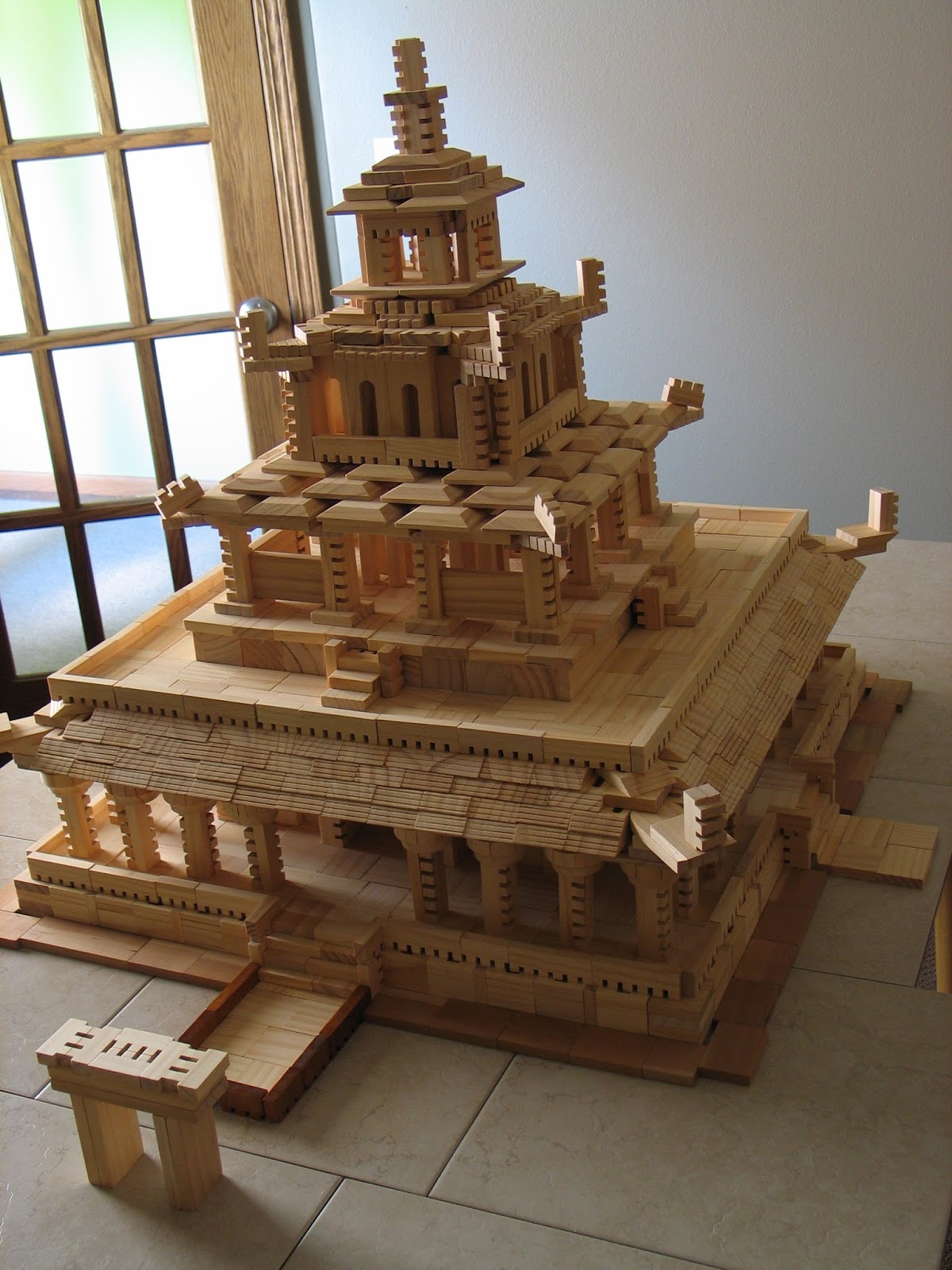
Quite some time back I worked on a pagoda style temple like this in minecraft which I really never finished. But the study I put into it was helpful when I began experimenting with an Asian aesthetic using the treehaus blocks.
Before I worked on this big temple, I built a number of smaller structures as practice and was surprised at how nice they looked, and at the various techniques that could be used to build these types of buildings.
I began building larger, and had a pretty good sized temple that was similar to the upper structure you see in this build. That got me thinking even larger and I started seriously contemplating a full fledged pagoda temple, but it wasn't really until I figured out the way I wanted to do the roof that I decided to give it a serious attempt.
Had I known just how close I would come to using every one of those slope blocks in my collection, I might have thought twice before building it quite this large. Luckily I had just enough. If I'd had more I think the design might have looked a bit nicer with a couple more layers. Still I think it turned out very nice over all.


Another new feature I made use of in this build is the lights. I was inspired to give this a try by some images of wood blocks I'd come across on Amazon. The blocks themselves weren't really compatible with the blocks I build with, but the lighting made the models look really beautiful. When it came time to photograph this temple, I decided to see what kind of lights I could find on the web. What I came up with were some simple led lights that are primarily intended for putting inside balloons or paper lanterns for decorations at weddings and the like. These were quite inexpensive and small enough to hide pretty easily inside the building. The main thing was I didn't need to worry about wires, since the structure was already built and it would have been incredibly difficult to weave wired lights through it without knocking it over.
Tuesday, August 18, 2015
Anker Stein in Sketchup
 |
| Set #6 as it's packed away for storage |

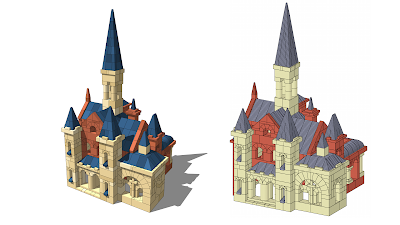
I've been working on this for the last couple weekends, and it turns out there is an absolutely huge number of block variations, which in this way makes it more like Lego than the Treehaus wood blocks that I've been building with the most of late. With so many blocks to model, it took a long time just to get something I could start to build with. I'm far from getting all the blocks available, but I have enough now that I've been able to build something nice. The church that's pictured here is a plan that I found on the Anker website. I think it turned out really well.
Once I had it built (a time consuming process in itself) I've spent quite a lot of time tweaking the lighting and materials and experimenting with the various style settings that Sketchup provides so that I could get just the right look. I think these renders look incredible, and are far better than some other cad-type drawings that are being used currently for displaying these models and for making building instructions.
 |
| Left side is a rendering with Sketchup, on the right side is Anker Cad |
Monday, August 17, 2015
First post. New blog, old builds.
This is my first post, first time blogging. This is a place I can share my various block-based creations, projects, and web discoveries related to one of my hobbies: building with blocks. That includes actual physical blocks, and virtual blocks as well. So basically anything from wood blocks to Lego to Minecraft.
Since I'm new to the whole blogging thing, this first post is sort of a practice run. I'll use it to share a few pictures of some of my earlier wood block constructions.
That Half Tower was my first impressive wood block tower. It blends Treehaus blocks with Blocksmith blocks. Treehaus are more versatile, cheaper, and I own a lot more, but Blocksmith are more detailed and precision made. Even though they aren't 100% compatible in size, I find they work well together, and the coloring differences are actually rather nice.
The Rook Tower was a bit of an experimental design, attempting to go away from the usual geometric shapes that towers tend to follow. I like the staggered height use of the half-round blocks in the lower 1/4, giving it a cool pattern. This photo doesn't show it but I also have a bit of a checker-board look at the base.
This one was a fun attempt to make a sprawling city. I made use of many new techniques, especially for forming the various walls.
Probably the tallest tower I will ever attempt. The Ghost Tower made use of every block in my inventory (at that time). I actually had to slide my dining room table once I realized it was going to hit the light. Placing the top most blocks was very tricky. What surprises me most about these large constructions is how durable they are. It's cool to see how the interesting methods I come up with hold up as I continue to add more and more blocks.
Well that's enough for the first post. I might go back and post more details and photos of these older builds at some point.
Since I'm new to the whole blogging thing, this first post is sort of a practice run. I'll use it to share a few pictures of some of my earlier wood block constructions.
 |
| Half Tower |
 |
| Rook Tower |
 |
| King's Landing |
This one was a fun attempt to make a sprawling city. I made use of many new techniques, especially for forming the various walls.
 |
| Ghost Tower |
Well that's enough for the first post. I might go back and post more details and photos of these older builds at some point.
Subscribe to:
Posts (Atom)